Quick Facts
- Category: Software Tools
- Published: 2026-05-03 22:43:24
- The Quiet Superiority of a 2021 Quantization Method Over Its 2026 Counterpart
- NVIDIA Unveils Nemotron 3 Nano Omni: All-in-One AI Model Slashes Multimodal Agent Costs by 9x
- What You Need to Know About Allocating on the Stack
- 10 Ways SUSE is Reinventing Itself as the AI-Native Infrastructure Platform
- Python Packaging Community Gains Official Governance Council
Introduction
If you work with CANopen CC networks or any Controller Area Network (CAN) bus, having a reliable tool to monitor and analyze traffic is essential. Whether you're debugging industrial machinery, automotive systems, or embedded devices, understanding what's happening on the wire can save hours of troubleshooting. Enter CANopenTerm, a terminal-driven utility designed by Michael Fitzmayer that brings real-time CAN bus inspection to your command line.
What is CANopenTerm?
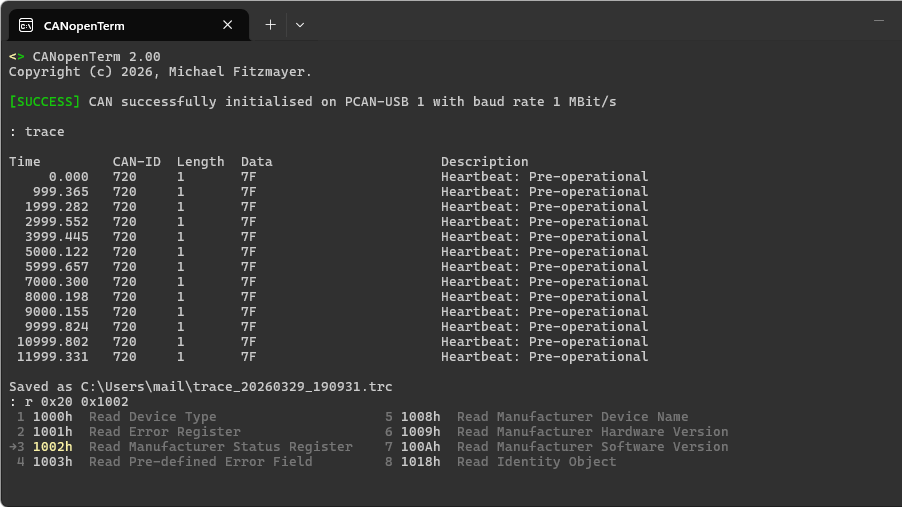
Despite its name referencing the CANopen standard (a higher-layer protocol built on CAN), CANopenTerm is actually a general-purpose tool for working with CAN buses. It operates entirely from the console, providing a lightweight, scriptable, and fast alternative to heavyweight graphical interfaces. The software is built for real-time use, allowing you to sniff raw frames, trace data, and probe nodes without the overhead of a GUI.
Key Features
Sniffing Raw Frames
At its core, CANopenTerm captures raw CAN frames in real time. You can view each packet as it appears on the bus, complete with identifier, data bytes, and timestamps. This raw-level visibility is crucial for understanding low-level bus behavior and diagnosing hardware issues.
Tracing and Probing
The tool supports tracing—logging all traffic for later analysis—and probing specific nodes by sending requests and monitoring responses. This makes it easy to verify node health, check for missing messages, or simulate traffic conditions.
Real-Time Console Interface
CANopenTerm's console-based design ensures low latency and minimal system resource usage. Unlike GUI tools that may buffer or delay data, this terminal app presents frames almost instantaneously, which is critical for time-sensitive debugging.
Scriptability and Extensibility
Lua and Python Scripting
For advanced users, CANopenTerm supports scripting via Lua and Python. This allows you to automate complex workflows, such as:
- Parsing and filtering specific message types
- Generating periodic test messages
- Logging data to files for post-processing
- Triggering alerts on error frames
Scripts can be loaded at startup or invoked on the fly, giving you tremendous flexibility without leaving the terminal.
Protocol-Aware Inspection
Although CANopenTerm works at the raw frame level, it can be extended with protocol-specific dissectors. For CANopen networks, this means you can interpret PDO, SDO, NMT, and other messages directly, making the tool useful even if your primary interest is the higher-layer protocol.
Why Choose a Lightweight Interface?
Many CAN analysis tools come with comprehensive graphical interfaces—think waveform plots, drag-and-drop configurations, and colorful dashboards. While these are powerful, they often introduce bloat and slowness. CANopenTerm's philosophy is: fast and scriptable over fancy. For engineers who live in the terminal, a text-based tool means:
- Speed: No GUI rendering delays; frames appear as they arrive.
- Automation: Scripts can run headless, integrated into CI/CD pipelines or automated test benches.
- Remote access: Works over SSH, so you can monitor a CAN bus on a remote embedded device.
Practical Applications and Use Cases
CANopenTerm shines in a variety of settings:
- Industrial automation: Debugging PLC-to-drive communication, verifying sensor data, and validating network topology.
- Automotive testing: Capturing CAN bus logs from vehicles, especially when combined with Python scripts to parse diagnostic messages (e.g., OBD-II).
- Embedded development: Probing custom hardware, verifying CAN transceiver operation, and testing firmware against real-time traffic.
- Education: Learning how CAN works at the frame level without expensive equipment.
Related Tools and Ecosystem
CANopenTerm is not the only CAN visualization tool out there. We've recently explored other options like CANtact and cangaroo, both of which offer GUI alternatives. However, for users who prefer a terminal-first approach, CANopenTerm stands out for its blend of power and simplicity. The CAN ecosystem is vast—ultimately, there is a lot of machinery running on some variant of CAN or another, so it pays to know how to work with it effectively.
Getting Started and Conclusion
If you aren't afraid of getting into the nitty-gritty with CAN and like lightweight text-based interfaces, CANopenTerm might be the tool for you. It's open-source, actively maintained, and easily adaptable to different CAN hardware backends (e.g., SocketCAN, PCAN, LAWICEL). Head over to the project's repository to download the source and start experimenting.
Have your own CAN projects cooking? Don't hesitate to let us know on the tipsline! We're always eager to share new tools and techniques for working with controller area networks.