Overview
Cloudflare has officially launched the closed beta of Flagship, a feature flag service designed to run directly on the global edge platform. Unlike traditional feature flag systems that require external API calls to a separate service, Flagship evaluates flags locally inside Cloudflare Workers—meaning lightning-fast decisions without network latency. Built on the OpenFeature standard, it lets you control feature rollouts, run A/B experiments, and toggle behavior changes without redeploying a single line of code.
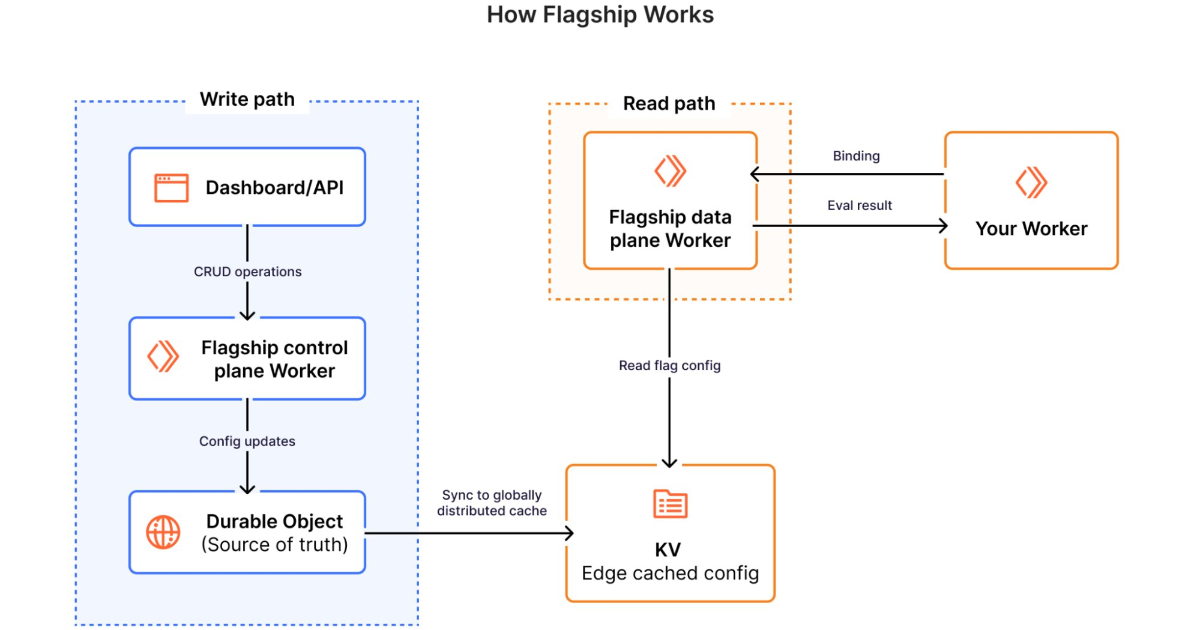
This tutorial walks you through the essential concepts, prerequisites, and a step-by-step guide to start using Flagship with your Workers. By the end, you will understand how to set up flags, integrate them into your code, and avoid common pitfalls.
Prerequisites
Before you begin, ensure you have the following:
- A Cloudflare account with access to the Workers platform (paid or free plan).
- Closed beta access to Flagship – currently by invitation only. Check the Cloudflare dashboard under the "Workers & Pages" section for the Flagship tab.
- Basic familiarity with Cloudflare Workers and JavaScript/TypeScript.
- The OpenFeature SDK for JavaScript (or your language of choice) – Flagship implements the OpenFeature specification, so you can use the standard client.
- Node.js and npm (or wrangler) installed for local development and deployment.
Step-by-Step Instructions
1. Enable Flagship in Your Account
Log into the Cloudflare Dashboard. Navigate to Workers & Pages > Flagship (beta). If you don’t see the tab, you may not have beta access yet. Once available, click Enable to activate the service for your zone.
2. Create Your First Feature Flag
Inside the Flagship dashboard, create a new flag:
- Flag Key: A unique identifier (e.g.,
new-checkout-flow). - Variants: Define two or more states – commonly
onandoff, but you can add any number of variants with associated payloads. - Targeting Rules: (Optional) Route traffic based on attributes like user ID, country, or random percentage.
- Default Variant: The value returned when no rule matches.
Save the flag. The dashboard will show a toggle to enable/disable the service-level evaluation, but for Workers you will evaluate the flag programmatically.
3. Install the OpenFeature SDK
In your Worker project directory, install the OpenFeature SDK:
npm install @openfeature/js-sdkFlagship provides a custom provider that connects to the edge infrastructure. You’ll need the @cloudflare/flagship-provider package (once released, currently in beta). For now, Cloudflare exposes a global FLAGSHIP object inside the Worker runtime – no extra installation needed. (Check Cloudflare docs for the exact API.)
4. Initialize the OpenFeature Client in Your Worker
In your Worker script, import the necessary modules and set up the client. Example using the global FLAGSHIP object (syntax may vary in final beta):
import { OpenFeature } from '@openfeature/js-sdk';

export default {
  async fetch(request, env, ctx) {
    // Access the Flagship provider
    const flagshipProvider = env.FLAGSHIP.getProvider();
    await OpenFeature.setProvider(flagshipProvider);
    const client = OpenFeature.getClient();

    // Continue with flag evaluation...
  }
}
Note: In many early beta versions, you can directly call env.FLAGSHIP.evaluate(flagKey, context) without explicitly setting up OpenFeature. The above shows the standard OpenFuture approach for portability.
/presentations/game-vr-flat-screens/en/smallimage/thumbnail-1775637585504.jpg)
5. Evaluate Flags Locally
Once the client is ready, evaluate the flag where needed. The evaluation occurs entirely inside the Worker – no external HTTP request:
const context = { targetingKey: 'user-123', country: 'US' };
const flagValue = await client.getBooleanValue('new-checkout-flow', false, context);

if (flagValue) {
  // serve new checkout flow
} else {
  // serve old checkout flow
}
The context object can include any attributes you defined in the targeting rules. The second parameter is the default value (fallback).
6. Deploy and Test
Deploy your Worker using Wrangler or the dashboard editor. Then make requests and verify the flag behavior changes based on your rules. Because evaluation is local, latency is minimal – typically under a millisecond.
Common Mistakes
1. Forgetting the Fallback/Default Value
Always provide a sensible default value in getBooleanValue() and similar methods. If the flag does not exist or there is a network error (unlikely for local evaluation but possible if the provider fails), the default ensures your code will not break.
2. Assuming Global Consistency
Flagship evaluates based on the data that is synced to the edge. If you update a flag in the dashboard, it may take a few seconds to propagate to all Cloudflare PoPs. During that window, different Workers may see different values. Plan for eventual consistency.
3. Overcomplicating Context
You do not need to pass the entire user object. Only include attributes used in targeting rules to keep the evaluation fast and avoid exposing sensitive data to the edge.
4. Not Using OpenFeature Properly
If you manually call env.FLAGSHIP.evaluate() everywhere, you lose the ability to switch providers later. Stick to the OpenFeature client interface for future flexibility.
5. Ignoring Beta Limitations
During closed beta, not all features may be available (e.g., audit logs, advanced metrics). Read the official documentation for current capabilities.
Summary
Cloudflare Flagship brings feature flag management straight to the edge, enabling fast, local flag evaluation in Workers without external round trips. By following the OpenFeature standard, it provides a vendor-neutral approach to toggling features and experimenting. With the steps outlined above—enabling Flagship, creating flags, initializing the client, and evaluating them—you can start controlling rollouts and A/B tests in your Workers today (beta access permitting). Remember to always provide defaults, understand eventual consistency, and keep the context lean. As the service matures, expect richer capabilities like gradual rollouts, multi-variate flags, and seamless integration with Cloudflare’s analytics.